
A Practical Way to Manage Siblings' Academy Schedules at Once
When you have one child, sticking a single timetable on the fridge can be enough. But once you have two children, the story changes. If your first child has math at 3:00, your second child has piano at 3:30, and both have taekwondo on Wednesday, this is no longer just about having twice as many items to manage. It becomes a coordination problem that includes overlapping schedules and travel routes.
Once you start keeping up with two children’s academy timetables at the same time, that complexity feels much more real. At first it looks like the number of schedules has simply doubled, but in practice, the difficulty is higher because travel routes and pickup order get tangled together too. Once school runs and academy drop-offs start overlapping, managing siblings’ academy schedules stops being a note-taking problem and becomes a logistics problem.

Photo by Jessica Rockowitz on Unsplash
The real reason two children’s schedules become complicated
It is not complicated just because there are twice as many academies. The real issue is overlap and dependency.
If you have to drop off one child at an academy and then go pick up the other, you need both schedules in your head at the same time. If one academy suddenly changes a lesson date, that change can easily affect the other child’s schedule too.
The point where notes stop being enough
When you have one child, notes can get you by. But once you have more than one child and different academies overlap on the same day, it becomes hard to answer “Who needs to go where today?” quickly.
At that point, saved WhatsApp screenshots or a paper notebook are fundamentally awkward because they are bad at showing two children’s information at the same time. You have to find the first child’s information, then the second child’s information, and manually piece the timeline together in your head.
The core of integrated sibling schedule management
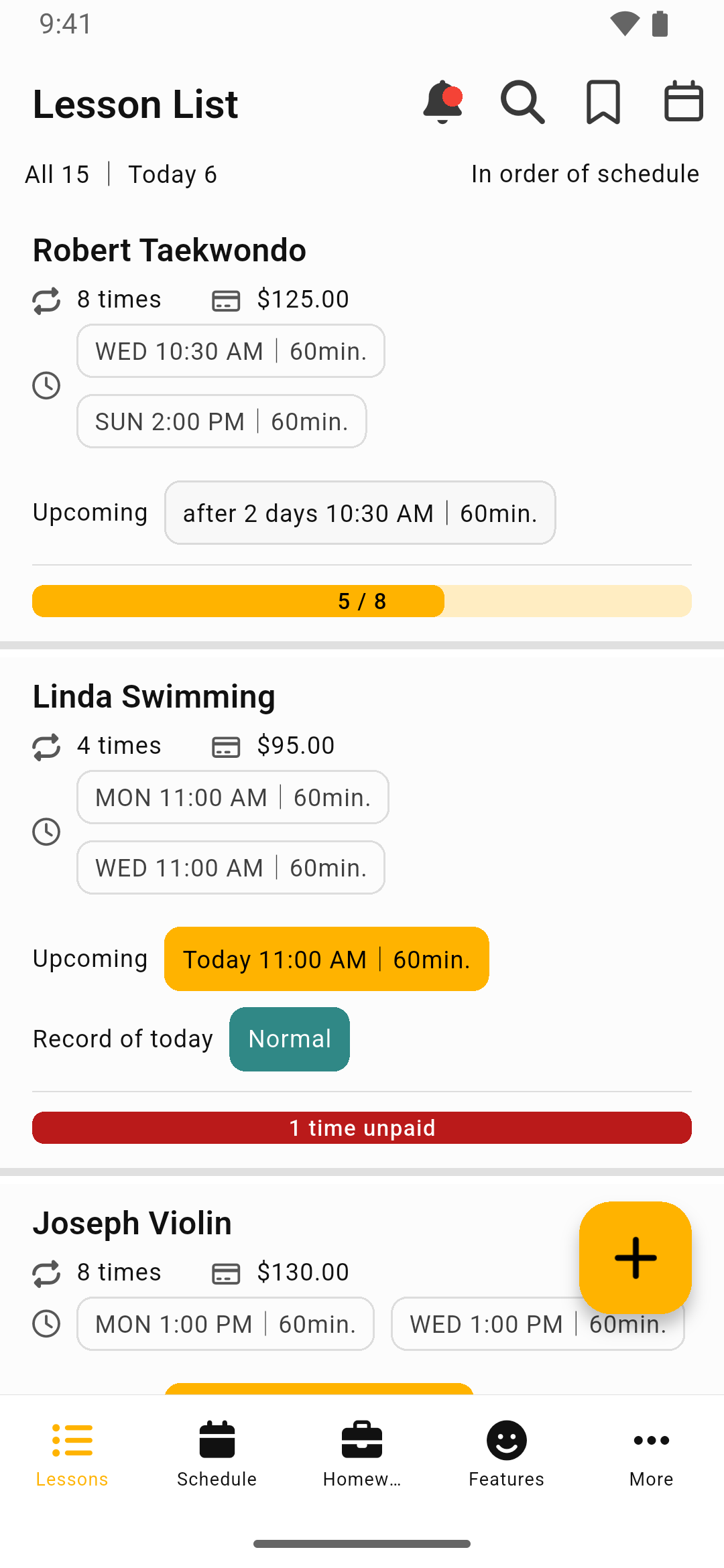
What you need here is a structure where you can compare both children’s schedules on the same screen.
Do not mix records by child
It works better to organize the academies, days, times, and teacher notes for each child in a way that keeps each child’s flow separate. That makes the reference point more stable even for questions like, “What was the number for my first child’s math academy teacher again?”
Bring everything together by date
Even if you enter each child’s schedule separately, you still need to be able to see the full schedule for today or this week at a glance in the end. You need a structure that lets you answer “Who needs to go where today?” immediately.
You should also track education costs by child
Managing the schedule is only half of it. Education cost matters just as much. When you have two children, seeing how much is being spent on each one is a basic part of household budget management.
If you want to answer “How much did we spend on my first child’s academies this month?” right away, the costs need to be recorded in a way that is separated by child. If you put everything into a general budget app simply as “academy fees,” it becomes hard to separate your first child’s costs from your second child’s later.
Understanding scattered payment dates
Every academy has a different payment date. When you have two children, the number of payment dates you need to track in a month increases a lot. If you try to manage all of that in your head, you will eventually forget one, and then late payments create unnecessary calls and messages.
Recording payment dates in advance and getting reminders is what prevents that.
A management approach that actually helps
If you have more than one child, the organization method that tends to help in real life looks like this.
- Register academy information completely separately for each child – including name, academy, day and time, tuition, and payment date
- Review the full weekly schedule together – so you can spot overlapping times ahead of time
- Check the expected education cost at the start of the month – so you know the total amount going out this month
What families with multiple children need is not more and more features. It is a structure where you “record separately and review together.” Lesson Manager is closer to that approach: lesson schedules, notes, and payment status are stored together in one place, and when you review them, you look back at the full weekly flow through the weekly timetable or calendar.
The advantage of that structure is that input and review play different roles. In real life, it is natural to use it by checking “Who goes where today?” all at once, reviewing the academy-fee flow at the beginning of the month to estimate the total education cost, and on weekdays checking overlapping time slots first. If you have two children, it is worth taking a step back and reviewing how you manage schedules. Small inconveniences tend to pile up and turn into larger mistakes.