What Actually Goes Wrong When You Organize Academy Schedules Without an App
Once a child starts attending one academy and then another, the questions start showing up. Where should I write the timetable? Where is the teacher’s contact information? When do I need to pay this month’s tuition?
I am a father of two daughters and also the developer who made Lesson Manager, and this app started from the same kind of frustration. I kept forgetting the home lesson schedule for my first daughter, especially her GABE class and its payment date, and when I looked for an academy schedule app that felt usable, I could not find one I liked, so I started making one myself. Now that my second daughter’s schedule is added too, academy timetables and school pickup routes have become much more complicated, so I feel even more clearly why managing academy schedules is difficult.
At first, most people solve it in familiar ways. A paper timetable on the fridge, saved screenshots from WhatsApp chats, handwritten notes in a notebook. These are quick and comfortable methods, but once your child is attending more than two or three academies, cracks begin to show.

Photo by Eric Rothermel on Unsplash
The most common problem: “Is there academy today?”
Your child asks the moment they get home from school. “Do I have piano today?” But when you try to answer, your mind pauses for a second. You start wondering whether this is the fifth class this month or the fourth, whether there was a makeup lesson last week or not.
When lesson times, weekdays, break days, and makeup dates are scattered only as text and photos, checking them in real time is harder than it seems. It gets even worse when each academy communicates differently. Academy A uses texts, academy B uses WhatsApp, academy C uses in-app notices. You have to open each channel one by one just to figure out the latest information.
The moment you miss a class-change notice
When an academy suddenly changes the lesson time or posts a cancellation notice, whether by text or WhatsApp alert, it often gets buried in the scroll. Many parents have experienced realizing too late and having a child waiting in front of an empty academy building.
The problem of not knowing your education costs
What gets even more complicated than the timetable is the cost. Every academy has a different payment date, cash and bank transfer get mixed together, and sometimes the amount changes based on the number of lessons. If you try to manage all of that in your head, there comes a point when you cannot answer the question, “How much did we spend on academy fees this month?” right away.
To figure out the total education cost for a month, you often have to go back through receipts and transfer records for each academy, and that takes more time than it should. And when tuition keeps increasing every few months, comparing how much more you are paying than last year becomes close to impossible.
Stress builds when information is scattered
At its core, timetable management is really about integrating information. Academy names, days and times, teacher contact information, monthly tuition, payment dates, lesson notes. If all of that is scattered across WhatsApp, text messages, notebooks, and your photo album, simply finding what you need in the moment becomes a task in itself.
If you have more than one child, that complexity does not just double. It grows much faster than that. Once each child’s academy information is being managed in a different way, gaps start to appear somewhere.
In the end, what you need is one place to look
The reason people move academy timetable management into an app is not vague. There are three practical things they need. You should be able to organize each academy’s basic information and payment details once, check today’s or this week’s schedule immediately, and update the relevant record on the spot when you see a change notice.
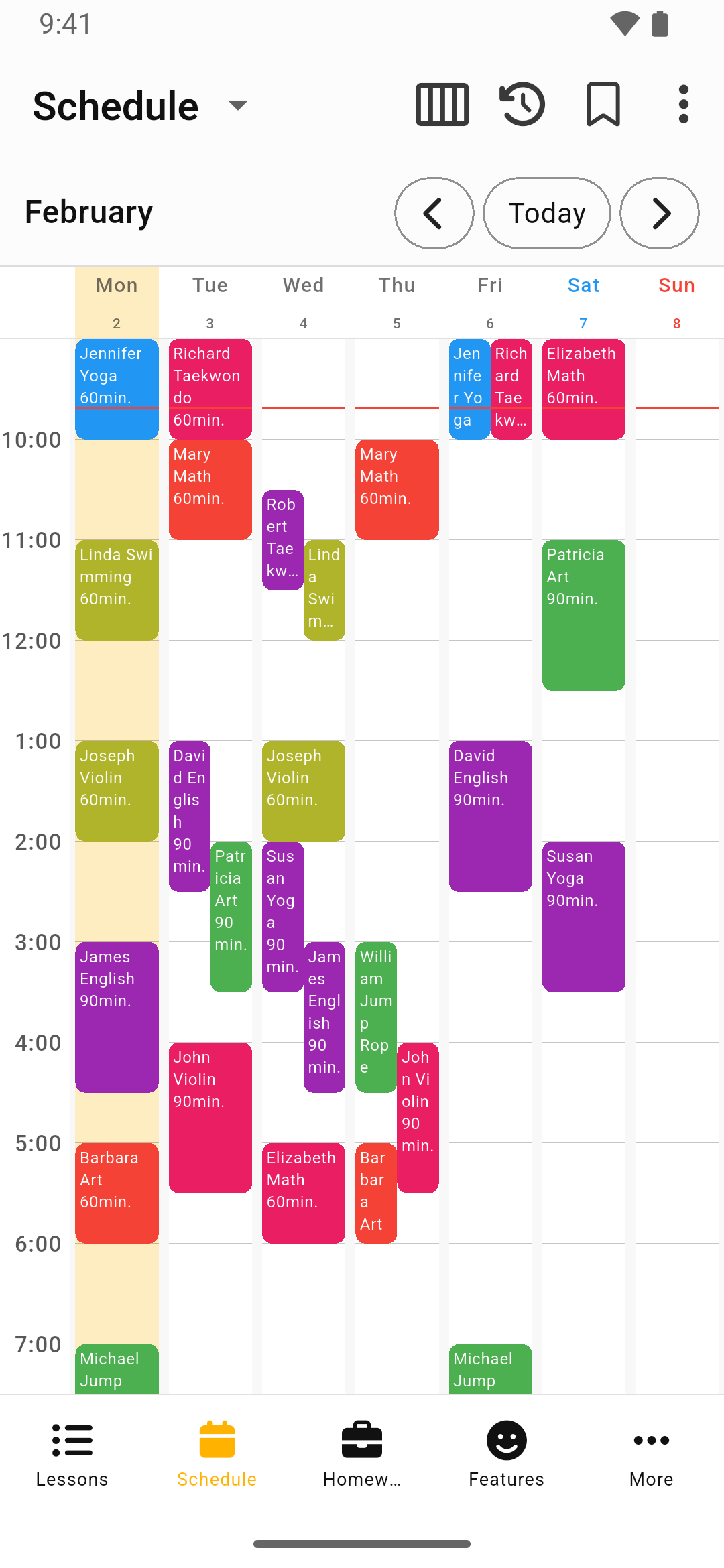
Lesson Manager was built around that flow. It lets you review schedules again in a weekly timetable and calendar, and when lesson times or cancellation information change, you can correct that schedule record directly instead of leaving it buried in a messenger thread. The reason payment dates and short notes are visible in the same flow is that once academy schedule management gets separated, you end up back in search mode.
For example, if a WhatsApp message says, “No class this Thursday,” it is more useful to update the date or note on that lesson right away than to merely save a screenshot somewhere. I also tried using messenger screenshots together with paper notes at first, but what actually helped was not saving more information. It was editing the right record immediately. Then when someone later asks, “There is class this Thursday, right?” you do not have to start by searching WhatsApp again. In the end, the core problem an academy schedule app should solve is not only gathering information in one place, but making sure the update happens in that same place too.
You can download Lesson Manager from the links below.