Why Tutoring Fees Are Easier to Manage in an App Than in Excel
Whether you are a tutor or a parent, a lot of people still use Excel to manage lesson fees. The reasons are simple. It is familiar, there is nothing new to learn, and it is already installed. But once you keep managing tutoring fees in Excel for a while, the rough edges start to show.
Before I built Lesson Manager, I tried using Excel together with notes. It felt fine at first because it was familiar, but as the records piled up, it only got more confusing to know where to look. That was when I realized that academy fee management and tutoring fee management are not difficult because there are a lot of numbers. They get difficult when schedules and payments start drifting apart.

Photo by Mika Baumeister on Unsplash
The practical limits of managing tutoring fees in Excel
At first, it is simple. Student name, lesson date, amount, paid or unpaid. You can make a clean sheet with just a few columns. But as the number of students grows and each student has more lesson variations, the file gradually becomes more complicated.
Using cell colors for status: Green for paid, red for unpaid, yellow for partial payment. It feels intuitive at first, but later you stop remembering your own rules.
The moment formulas get tangled: If you add a student in the middle, change the number of lessons, or insert a canceled class, you have to fix the formulas again. That makes errors easy to create, and then finding those errors becomes another task.
Hard to read on mobile: When you open an Excel file made on a PC on your phone, readability drops a lot. It gets inconvenient when you need to check something quickly while you are out.
The more irregular the lessons, the more complex the record becomes
If lessons always happen on the same day at the same time every week, Excel can be enough. The problem is that real life rarely works like that. A child misses a week, dates shift around holidays, or a makeup lesson gets added.
To reflect those variables in Excel, you have to manually change dates and counts, then confirm that the related formulas still calculate correctly. The task itself is not hard, but the more often it repeats, the more annoying it gets, and that is when mistakes creep in.
What is different when you manage it in an app?
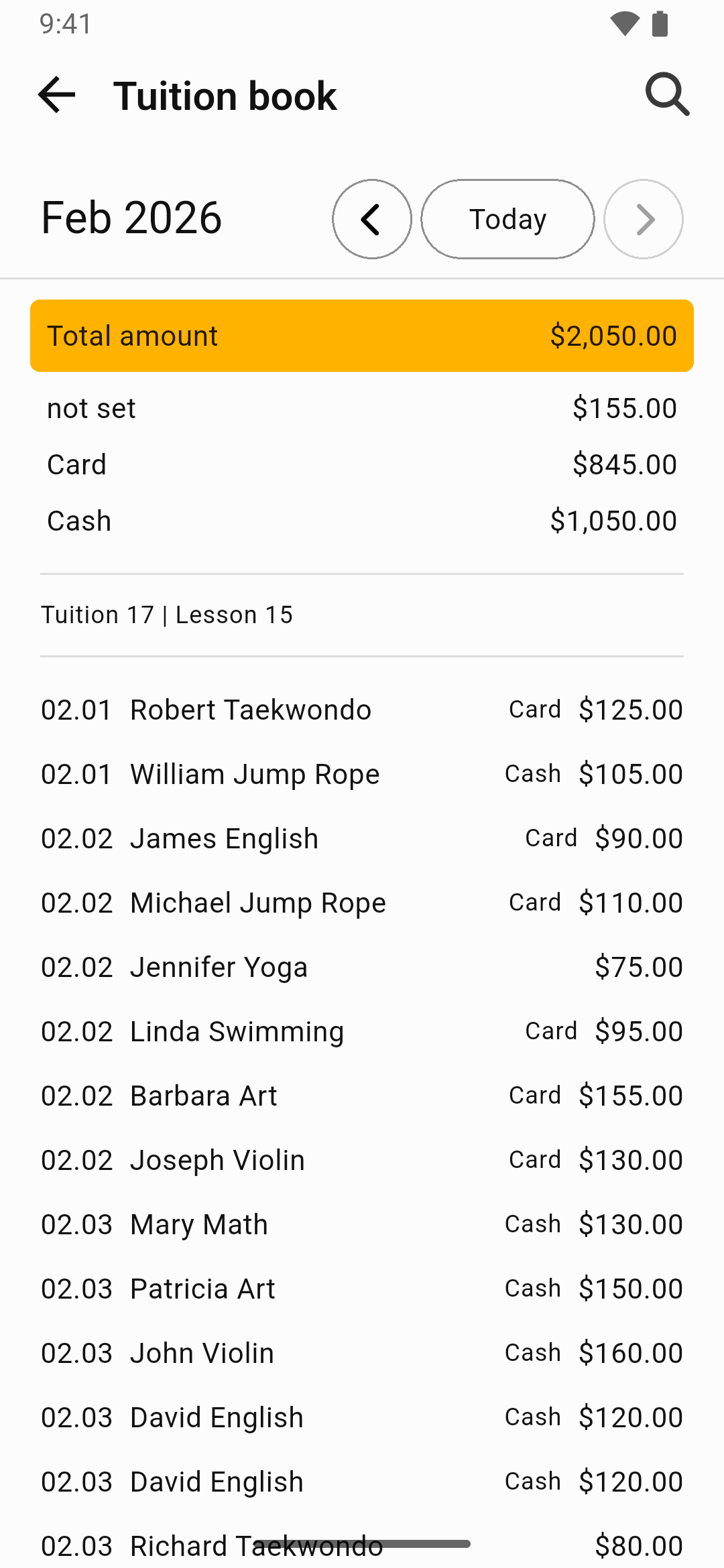
The core advantage of a lesson fee app is that schedule information and payment information stay in the same flow when you record and review them. You still enter the records yourself, but once a class and its payment status are saved, they become much easier to review again on a monthly screen.
Recording lesson by lesson
Excel is mainly built around table-style data entry, but an app records each lesson as its own item, almost like a card. You can manage the date, time, lesson details, and payment status on one screen, so even if lessons are irregular, you do not lose the flow.
Monthly settlement summary
At the end of the month, you can review that month’s lesson records and payment status in one place. You do not need to build formulas yourself as you do in Excel, though the app does not enter records for you. It is closer to reviewing the monthly flow based on the lesson records you entered one by one.
A smartphone-first workflow
Right after class, while moving between places, or in a short evening break. An app lets you open your phone and record things right away, so you are less likely to miss the timing. Excel often works best when you are sitting in front of a PC, and that difference in access eventually turns into a difference in habit.
What to check before switching
Before moving from Excel to an app, it helps to check a few things.
- how you will migrate your existing data
- whether the app supports your lesson structure, such as group or individual lessons and your fee model
- whether you can use it offline
The important part of switching is not moving an Excel table over exactly as it is. It is changing the unit of record from a “row” to “one lesson.” Lesson Manager was built around that idea so that the date, lesson content, and payment status are reviewed in the same flow. So when lessons change irregularly, the experience is less about fixing formulas and more about steadily recording the lessons that actually happened.
At the end of the month, those records become the basis for settlement. You review which days had lessons, which ones still are not marked as paid, and what this month’s payment flow looked like through monthly statistics and lists. In the end, the part I focused on most in building something that can work like a tutoring fee management app was not making a pretty table. It was making a flow where records do not get interrupted while you are on the move and where the month-end review follows naturally from the same record. If you teach more than three students or your lesson patterns change often, the difference feels bigger than you might expect.
You can download Lesson Manager from the links below.